Tool Use: The Concept Behind Every new AI feature in 2026
A practical guide about the concept that is powering everything what is going on with AI in 2026During the development of AI, we jumped from "I can ask questions to an artificial intelligence" to "I can have an autonomous agent like J.A.R.V.I.S. from Iron Man" at incredible speed. We hear a lot of excitement about agents, MCP, or OpenClaw, but have you ever wondered whether these concepts are overkill for your practical workflow or product integration? I did.
This article is about the concept that makes all of these developments possible: tool use. Not the frameworks built on top of it, not the protocols that standardize it, but the raw mechanism itself. We will look at what it is, how it works, and how to implement it based on a real example. If you understand this, the rest of the AI landscape starts to make a lot more sense.
MCP → Standardized way to share tools across different AI systems
Agents → System that has a goal in mind and tries to achieve it with repeated tool call loops
Skills → Tools wrapped in a product interface
When talking about the newest AI developments, mostly tool use sits at the base of all of it. It is the mechanism that lets a language model reach outside of itself and interact with the outside environment.
So why is it that youtube is full of videos about agents or skills and I rarely find something about tool use? Part of the reason is that agents make a better story. An autonomous AI that plans, decides and acts feels like science fiction becoming real.
The other reason is that the products made it invisible. Claude Code, Cursor, GitHub Copilot. These tools use this mechanism constantly, but we only experience the output. The file gets written, the query gets answered, the PR gets reviewed. This all appears like black magic and we often do not dare to look under the hood.
That is a problem, because the magic is exactly what you need to understand if you want to build something yourself. And it is actually straight forward. For most workflows or projects you do not need a full agent framework to make your product smarter. You do not need to implement MCP to connect a model to your data. In most practical cases, you just need to understand tool use.
What Tool Use Actually Is
Let's start with the basic problem tool use solves. A language model, on its own, knows a lot, but everything it knows is frozen at the point it was trained. Ask it for today's stock price of NVIDIA and it cannot answer honestly, or the model decides to search the web and your application goes off to do that (*which also is tool use by the way). It has no way to look anything up. It cannot run code, query a database or call an API. It can only work with what is in its training data and what you put in the prompt. For a lot of tasks, that is fine. For anything that requires current, specific or private information, this is not enough. Tool use lets you break this limitation.
The idea is straightforward. Before you send a request to the model, you describe a set of functions that your application can run. You tell the model what each function does, what inputs it expects, and what it returns. The model reads these descriptions the same way it reads everything else, as context. It does not have access to the functions themselves. It just knows they exist.
When the model decides that one of those functions would help it answer the question, it does not call the function directly. It cannot. Instead it produces a structured response that says, in effect, "I need you to run this function with these inputs." Your application receives that response, runs the actual function, and sends the result back to the model. The model then uses that result to form its final answer.
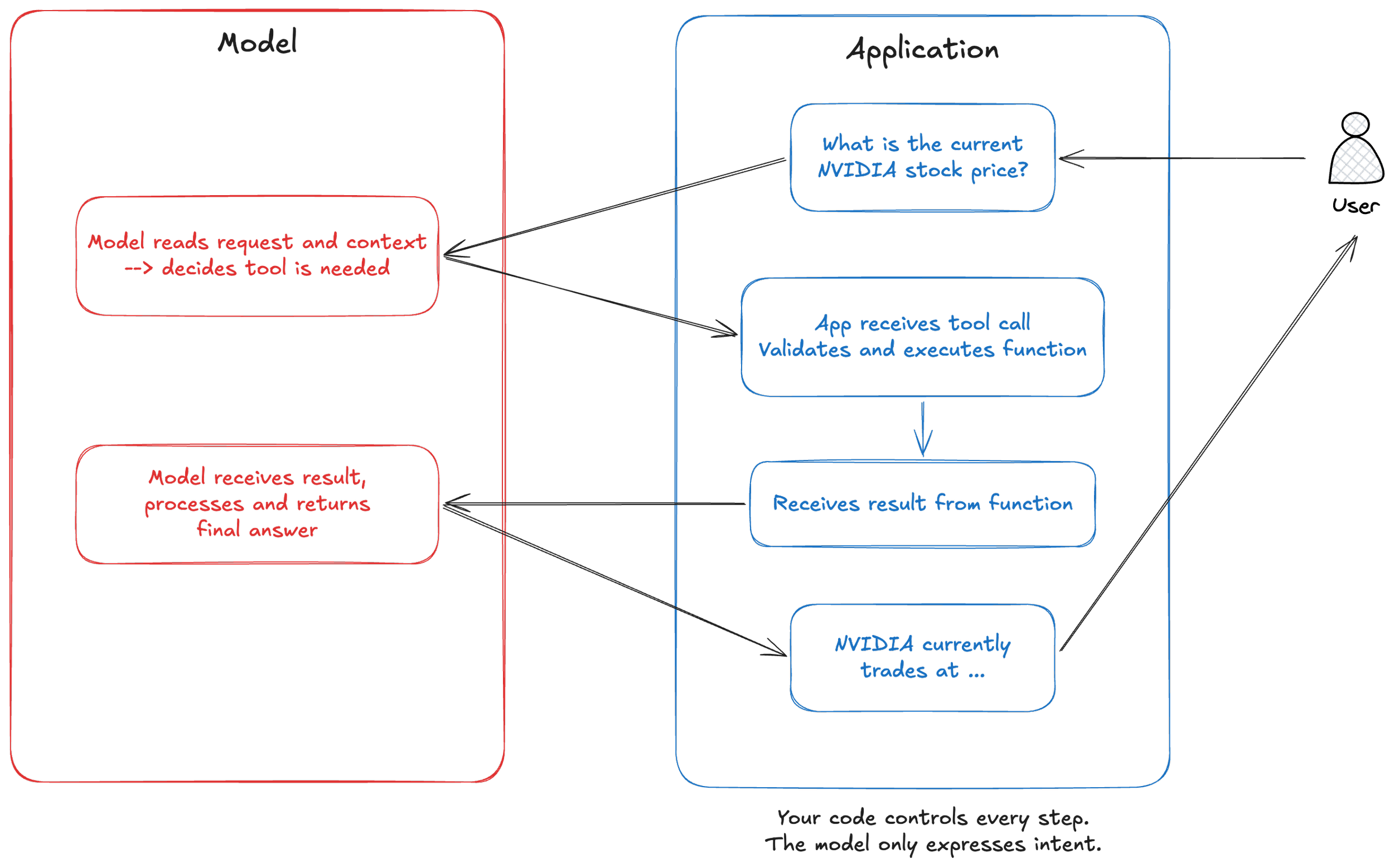
There is one thing worth mentioning here. Your application stays in control at every step. The model is not executing anything. It is expressing an intent in a structured format, and your code decides what to do with that intent. You can do validation, implement logging, introduce rate limits or reject executions. The model makes the decision, but does not execute. That distinction matters a lot when you start thinking about building this into a real product, because it means you are not handing over control. You are giving the model a voice in a conversation that your system still owns.
Here is what that looks like in practice with the Anthropic API. When you define a tool, you give it a name, a description, and a schema for its inputs. The description acts as instruction for the AI model. The model reads it to understand when and how to use the tool, so the words you choose shape the model's behavior directly.
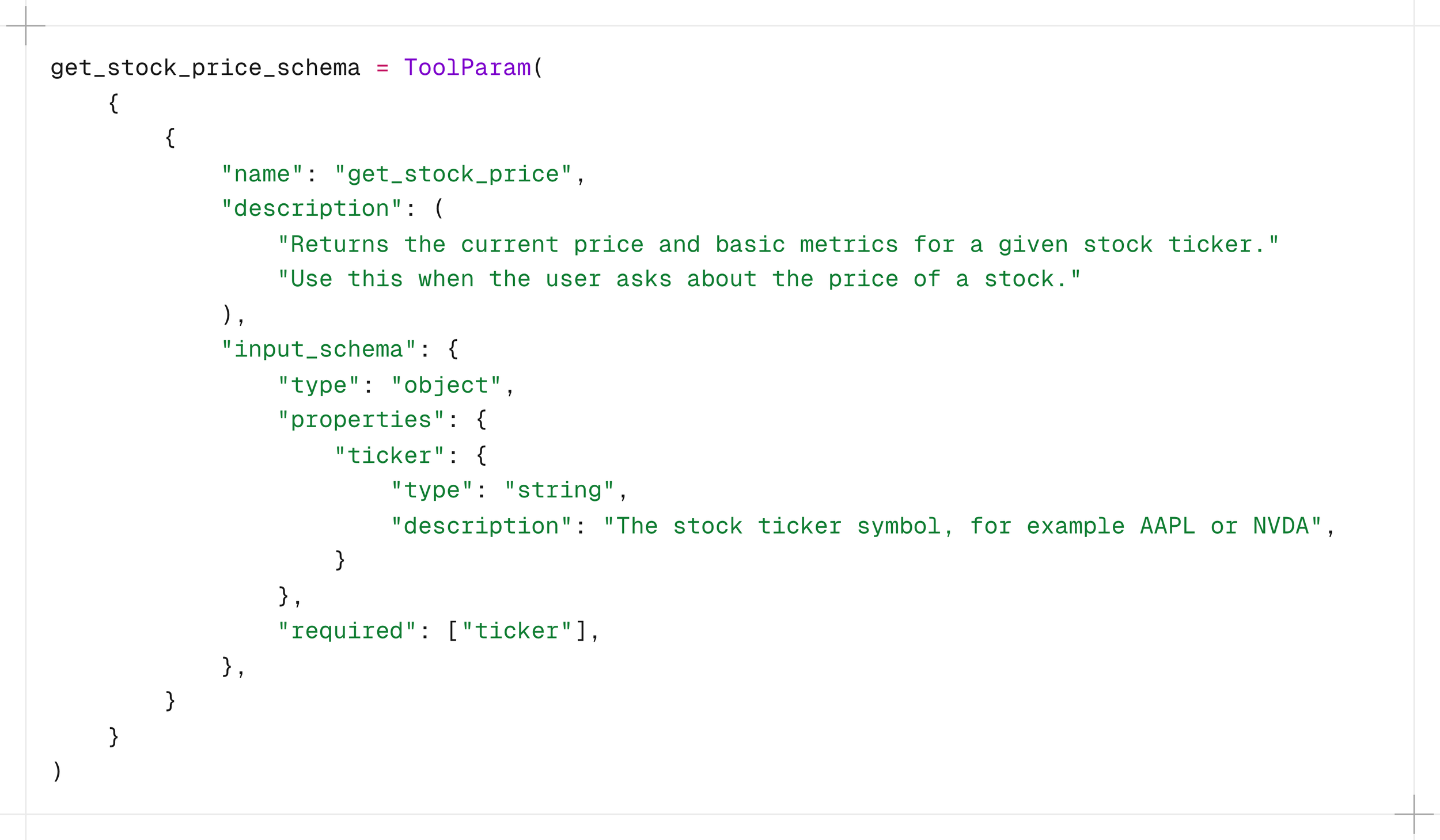
When the model decides to use this tool, it returns a tool use block that contains the function name and the input values it has chosen. Your application catches that, runs the real function against yfinance or whatever data source you are using, and sends the result back as a new message in the conversation. The model then continues from there.
That is it. There is no black magic. There is no autonomous decision making happening outside of your application's control. There is a model that is very good at reading context and deciding what to ask for, and a loop that your code manages from start to finish.
implementing it
The project is a small Python application that connects Claude to real-time market data via yfinance. Ask it about a stock and it goes off to fetch the actual data, then comes back with an answer grounded in reality rather than its training data. Here is what that looks like in practice.
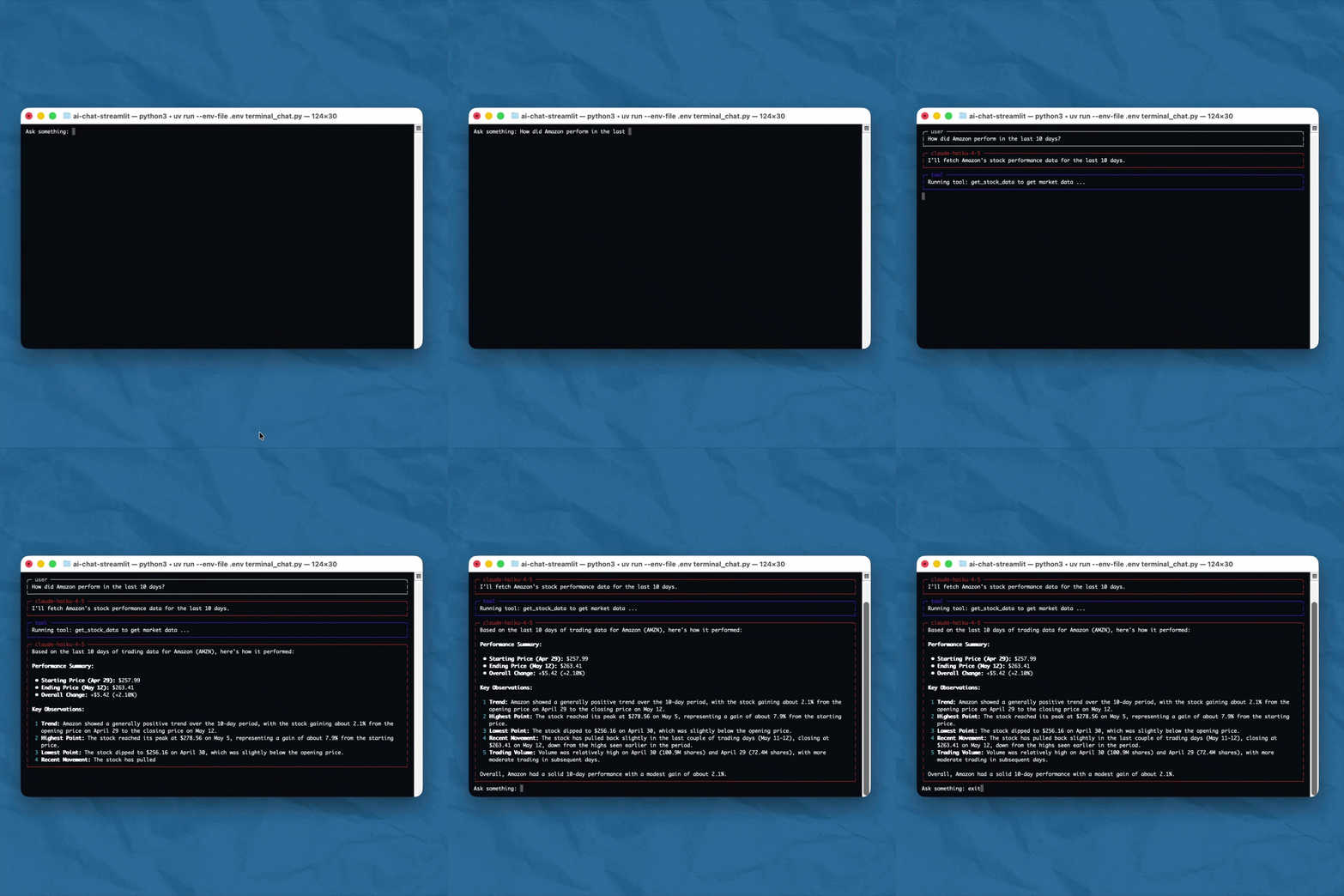
Yes, the example uses a chat interface. But the implementation underneath is identical whether you are embedding this into a dashboard, a backend service, a Slack bot, or a scheduled report. The chat is just the surface. What matters is what happens between the user's question and the model's answer.
You can find the full implementation in this GitHub repository: https://github.com/svengonschorek/ai-chat-terminal
The core implementation lives in two files:
terminal_chat.py manages the conversation loop
tools/yfinance_tools.py holds the tool function and its schema
That separation matters. In a real product you might have ten tools across multiple modules. Keeping them out of the conversation logic means the structure scales without becoming a mess.
Defining the tool
Before any tool call can happen, you need to define two things: what the tool actually does, and what you want the model to know about it.
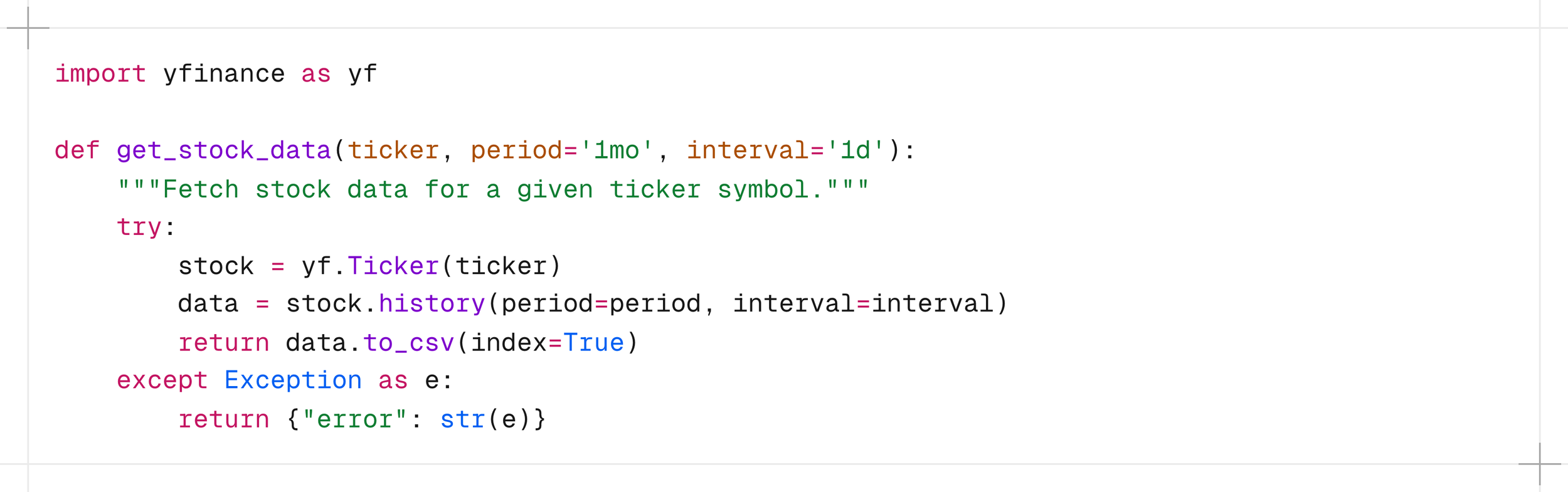
The function itself is straightforward. It calls the yfinance API and returns the data as CSV.
Then you define the schema. This is what the model actually sees. Notice that the description is not only a documentation, it is an instruction. The words you choose here directly shape when and how the model decides to call the tool.
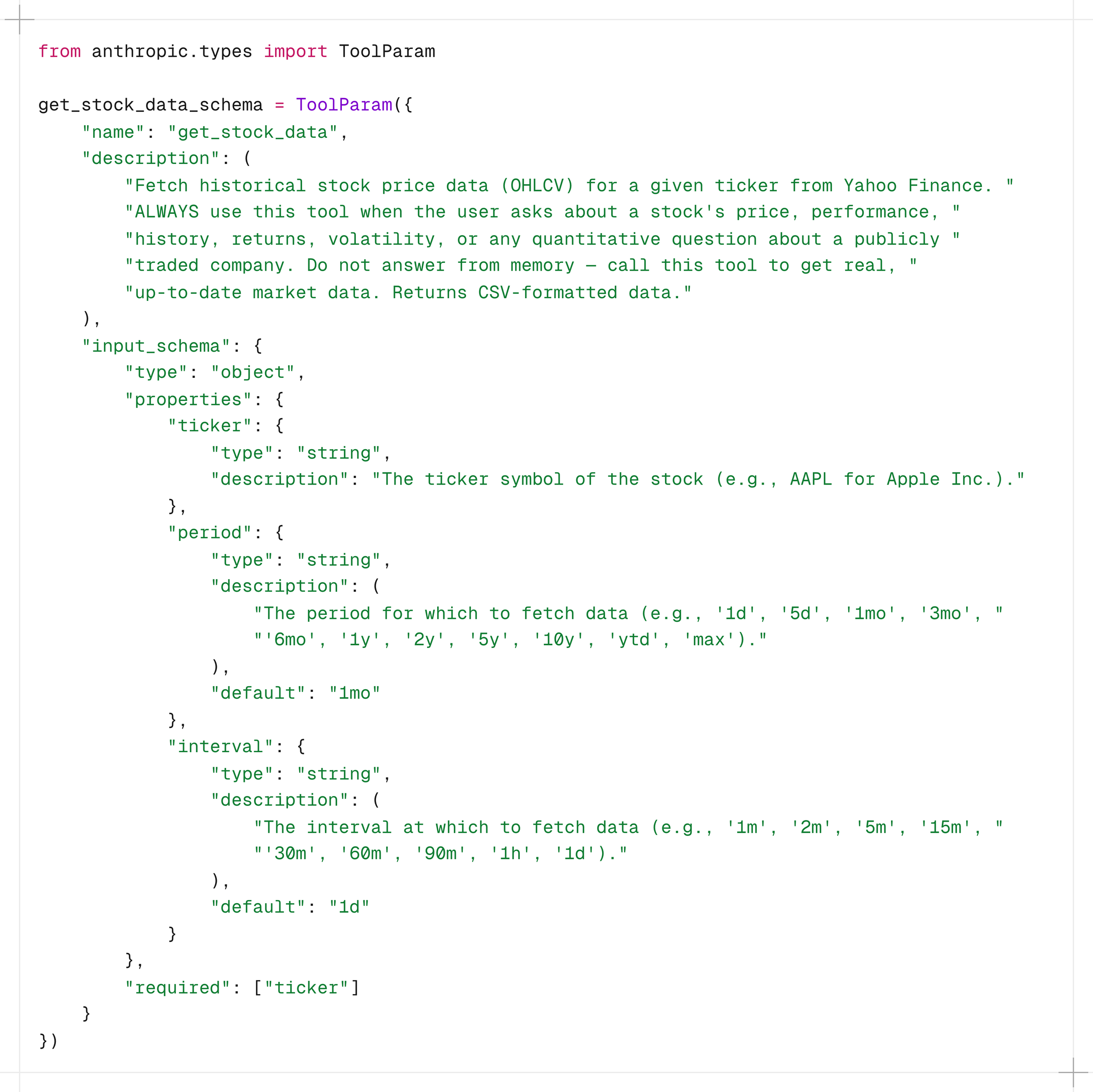
That "Do not answer from memory" is where you can see that this is an instruction and not a description. Without it, the model might confidently answer a stock price question from its training data, which is both stale and wrong. The schema is your first line of governance.
the conversation loop
This is where the loop from the diagram earlier becomes actual code.
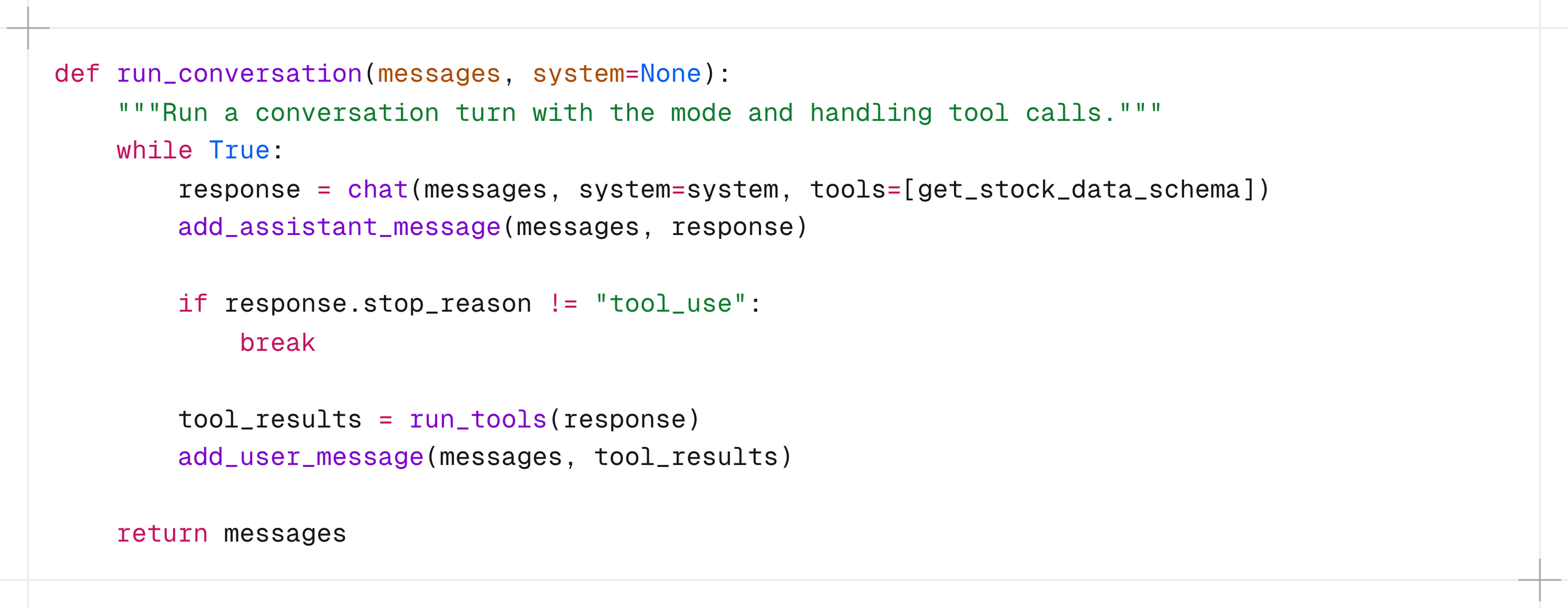
The model is called with the schema attached. If it decides a tool is needed, stop_reason comes back as “tool_use” instead of "end_turn". The application catches that, runs the function, appends the result to the message history, and loops. The model never called anything itself. It expressed an intent. The code in the application acted on it.
executing the tool
When the model signals it wants a tool, run_tools() takes over.
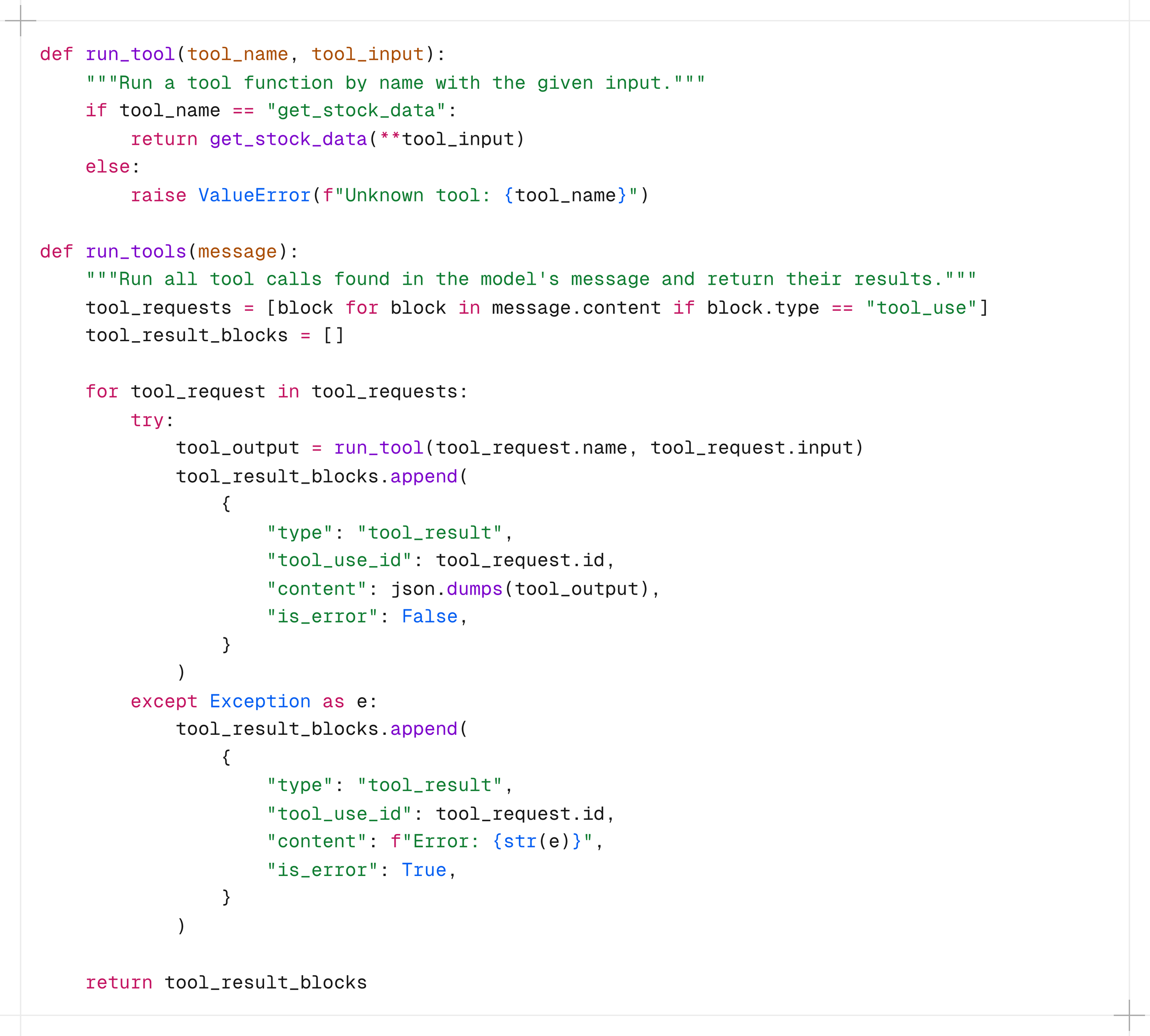
You validate the tool name, call the function, and decide what gets returned. If something fails, you catch it and return an error result instead of crashing the loop. The model receives whatever you send back and reasons from there.
the result going back
The last piece is simple. The result goes back as a user message with a tool_result type, paired to the original tool call by its ID.

That one line closes the loop. The model now has real market data in its context and can form an answer. What the user sees is a confident, grounded response. What actually happened was a structured handshake between the model and your application.
That is all tool use is. A structured request, a real function call, a result returned. The complexity of your product lives in the tools you build, not in the mechanism that calls them.
What This Means for Product and System Design
Most teams that start exploring AI integration ask "should we build an agent?" when they should be asking "what decisions do we want the model to make, and over what data?" Tool use forces you to answer the second question precisely. That is why it is the better starting point for most product integrations.
You are building a governed interface
When you define tools, you are defining a governed interface between a reasoning layer and your systems. Every tool you expose is a decision about what the model is allowed to ask for. Every tool you leave out is an equally calculated boundary.
This also changes where your engineering effort goes. Instead of writing routing logic you write good tools and good schemas. The model handles the routing at runtime, based on actual context. Your job shifts from anticipating user intent to designing systems that can respond to it.
Every tool call is a structured, loggable event
When a model generates an answer from memory, you have no record of what data it used or why it said what it said. When it calls a tool, you have a structured event: which tool, which inputs, which output, at what time. That matters for debugging, for auditing, and for trust. Tool use gives you that traceability without any extra instrumentation.
The model decides. Your code acts.
This is the mental model shift that matters most for system design. The model is not executing anything. It is expressing a structured intent, and your application decides what to do with it. You can validate it, log it, rate limit it, or reject it. That means you can adopt this pattern incrementally without handing over control of your infrastructure. Most AI integrations ask you to trust the model. This one asks you to trust your own application.
Famous last words
Next time you hear about agents, MCP, or whatever the next framework is called, you now know what is actually running underneath. The full implementation is on GitHub. And if you want to go deeper on the API side, the Anthropic Academy has a solid course on building with the Claude API that covers the broader feature set well. The concepts stack quickly once the foundation is clear.